Best Free Splid Alternative With No Group Limit
Last updated: July 14, 2026
Before we built Splital, we used and considered Splid. It offers a free plan with no ads, and an affordable one-time purchase to unlock some extra functionality. However, Splid is missing some features we need: the free version only allows one group, there are no Recurring Expenses, no reusable Custom Default Split, no image attachments, and Simplify Debts is always on.
We built Splital for users who want more, while offering a free experience with no ads.
Today Splital has more than 150,000 users and a 4.8/5 average rating from 2,000+ reviews across the App Store and Google Play.
At a glance
Splital is a Splid alternative for people who want more control of their finances: unlimited groups for free, Recurring Expenses, a reusable Custom Default Split, automatic categorization, advanced charts, and the option to turn off Simplify Debts. Splid is a great pick if you mostly manage a single group and prefer a one-time purchase to a subscription.
Download Splital for free
Available on Android and iPhone. No account needed.


Why people look for a Splid alternative
Splid is free with no ads, and handles the basics of splitting expenses well. People look for an alternative when they need something Splid doesn't offer:
- More than one group. Splid's free version limits you to a single group.
- Recurring Expenses that get added automatically, instead of adding the same rent or subscription by hand every month.
- A Default Split to save and reuse, instead of setting the same custom split by hand on every expense.
- Automatic categorization, instead of picking categories manually.
- Advanced charts that let you understand where your money goes.
- The option to turn off Simplify Debts, so you can see the direct balances between people.
- A way to get your groups back after reinstalling or switching phones, instead of rejoining each one by hand.
If any of these is how you want to split expenses, that's usually the moment Splid starts to feel limiting.
What makes Splital different
The biggest difference is how actively the two apps are maintained. Splid is an independent app born in 2015 in Germany, made by a single developer, Nico. He's been releasing just one update per year to keep the app compatible with Android and iOS.
Splital is a younger independent app born in 2024 in Italy, made by a couple, Maria and Maurizio, which is growing fast and already has all the features Splid has, and some Splid still lacks after all these years. We ship an average of one update per week and keep releasing new features and improvements based on user feedback.
Splital vs Splid: the full comparison
Here is how Splital and Splid compare, feature by feature. We've marked where each app is better.
| Splital | Splid | |
|---|---|---|
| Average rating | 4.8/5 | 4.9/5 |
| Unlimited groups | Free | Pro |
| Recurring Expenses | Free | Missing |
| Custom Default Split | Free | Missing |
| Automatic expense categorization | Free (~90% accuracy) | Missing |
| Statistics and charts | Pro (advanced) | Pro (basic) |
| Disable Simplify Debts | Free | Always on |
| Image attachments | Pro | Missing |
| Add notes to expenses | Free | Missing |
| Export to PDF | Pro | Free |
| Export to spreadsheet | Pro (CSV) | Pro (Excel) |
| Registration | Optional | Missing |
| Works offline | Free | Free |
| No ads | Free | Free |
Comparison based on publicly available information about Splid as of July 2026. Splid's features and pricing may change over time, so check their App Store listing for the latest.
What users say about Splital
Splital has over 150,000 users and an average rating of 4.8/5 based on 2,000+ reviews. Here's what some of them say.
“Ad free experience and easy to use”
“Has everything a bill-splitting app should have, with a top-notch interface”
“Excellent app. Very intuitive and the free version is fully functional.”
“I've tried so many apps like this, and I can honestly say this is one of the best. Well made and has everything. Great work, developers!”
Download Splital for free
Available on Android and iPhone. No account needed.
Why Splital is a great Splid alternative
These are the features you'll notice most when you switch from Splid to Splital.
Unlimited groups for free
Splid's free version lets you manage only one group. Creating a second group requires a one-time in-app purchase.
In Splital, you can create as many groups as you want, for free. Keep your trips, your apartment with roommates, and your everyday expenses with your partner as separate groups, each with its own balances and history, without paying for it.
Recurring Expenses
Rent, a shared streaming plan, a monthly cleaner: some expenses come back every single month, and logging them by hand is easy to forget. Splital adds them for you automatically with Recurring Expenses. You set the amount, the split, and the schedule once, and each new instance appears on time.
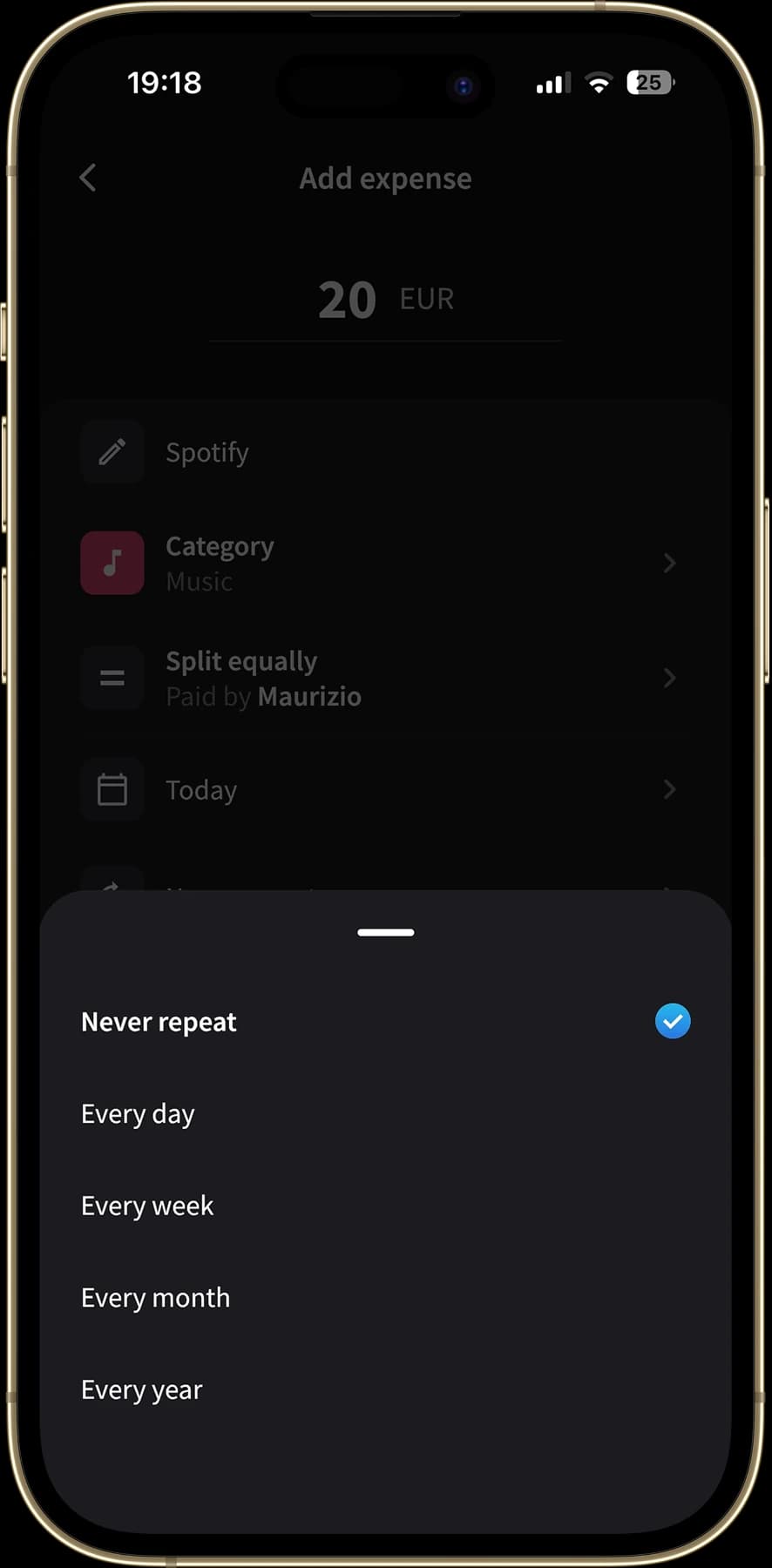
Splital adds Recurring Expenses automatically on the schedule you set
Splid has no Recurring Expenses, so every repeating charge is a manual entry you have to remember.
Custom Default Split
If you and your partner always split 60%/40%, you shouldn't have to set that up on every expense. In Splital, you save a Custom Default Split once and it applies automatically to new expenses in the group. You can still override any single expense when you need to.
Splid offers no ability to save a Default Split.
Automatic categorization and advanced charts
One of the best reasons to track expenses is understanding where your money goes, and that only works when every expense lands in the right category on its own.
Splital reads the expense description, like "Carrefour" or "Uber", and files it under the right category automatically. From our tests involving thousands of expenses in different languages, Splital automatically sorts around 90% of expenses into a meaningful category. It then turns that into spending breakdowns by category, subcategory, and person.
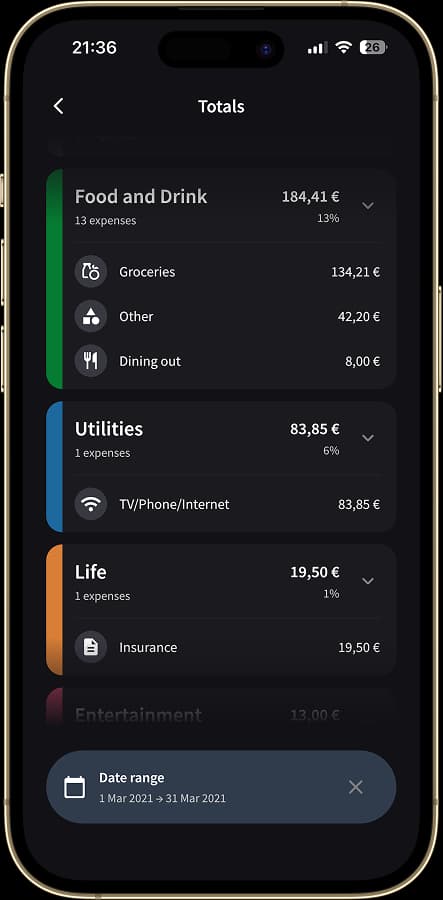
Splital organizes your expenses into categories automatically
Splid asks you to pick a category by hand, and its statistics are much more basic. You can read our statistics post to see how much further Splital goes.
Turn off Simplify Debts
Simplify Debts is handy when a group has lots of people, but sometimes you want to see the real, direct balances instead of a simplified version. Splital lets you turn Simplify Debts off whenever you like.
Splid always minimizes the number of payments at settle-up, and it offers no way to switch that off and see who directly owes whom. If you prefer that control, Splital gives it to you.
Attach receipts and photos
Sometimes an expense needs a receipt attached to it, for a shared shopping trip or a bill you'll want to check later. Splital lets you add image attachments to expenses. Splid doesn't offer image or receipt attachments, so there's no built-in way to keep a photo alongside an expense.
Notes on every expense
Splital lets you add a note to any expense, so "Groceries" becomes "Groceries, the fruit is just mine and shouldn't be split." Splid doesn't let you add notes to expenses, so any extra detail has to live in your memory or a separate chat. Notes are free in Splital.
Optional login
Splid has no login at all. To use Splid on another device, or after you reinstall the app, you have to rejoin each group by its code or link, and if you didn't save those, a group can be hard to get back.
Splital works differently. You can start using it right away without signing up for as long as you want, and once you decide you like it, you can create an account. From then on, switching to a new phone just means logging back in: every group, expense, and balance is exactly as you left it. You get the no-signup convenience while you're trying the app, and safety once you've created an account. You can read more in our multi-device login post.
Where Splid is better
Splid has a couple of things that might be better for you.
One-time purchase
Splid's paid features are unlocked with a one-time in-app purchase, not a recurring subscription. Splital Pro is a subscription. If you'd rather pay once and never think about it again, Splid's pricing model is more appealing than ours.
Free PDF export
Splid lets you download a PDF summary of a group for free. In Splital, exporting to PDF or CSV is part of Splital Pro. If a free export is important to you, Splid has the edge here.
Who should use which?
Both apps work well, so it really depends on what features matter most to you.
Choose Splital if you:
- Want unlimited groups for free
- Need Recurring Expenses added automatically
- Like saving a Default Split once and reusing it
- Want automatic expense categorization
- Need better charts and statistics
- Prefer the option to turn off Simplify Debts
- Keep receipts and photos on your expenses
- Want an optional login that restores everything on a new device
Choose Splid if you:
- Prefer a one-time purchase over a subscription
- Want a free PDF export
What's free in Splital, and what Pro adds
Splital is freemium, with no ads on any tier. The free plan covers everything you need to split expenses, including unlimited groups, Recurring Expenses, Custom Default Split, automatic categorization, and turning off Simplify Debts.
Splital Pro adds advanced statistics and charts, PDF and CSV export, and image attachments. You can see exactly what's included on the pricing page.
Splid alternative FAQ
What is the best alternative to Splid? Splital is the best alternative for most people who need more features than Splid offers. It lets you create unlimited groups for free, while Splid's free version limits you to a single group. Splital also adds Recurring Expenses, a reusable Custom Default Split, automatic categorization with advanced spending charts, and the option to turn off Simplify Debts, none of which Splid offers.
Do I need an account to use Splital? No. You can download Splital and start splitting expenses without signing up, just like Splid. The difference shows up later: Splid has no login at all, so if you reinstall the app or switch phones you have to rejoin your groups by hand, while Splital's optional account lets you log back in on any device and pick up exactly where you left off.
Download Splital for free
Available on Android and iPhone. No account needed.