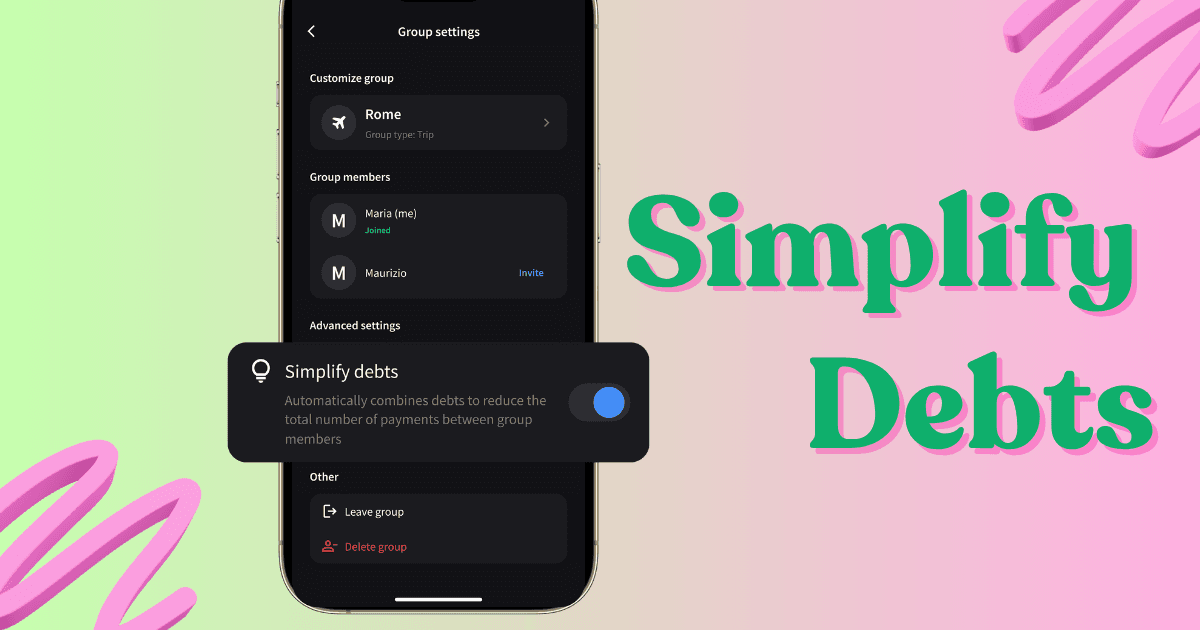
Simplify Debts collapses a group's web of who-owes-whom into the fewest possible payments. It's off by default in every Splital group, and you can turn it on per group from the settings, completely free.
If you owe Mario and Mario owes Luigi the same amount, Splital tells you to pay Luigi directly. One transfer instead of two. Multiply that across a group of six on a long trip, and a fifteen-debt mess can collapse into three or four clean payments.
What Simplify Debts actually does
Imagine a weekend trip with Mario and Luigi. By the end:
- You owe Mario €20 (he paid for dinner)
- Mario owes Luigi €20 (Luigi paid for the petrol)
Without Simplify Debts, you'd see two payments to make: you to Mario, then Mario to Luigi. Two transfers, two confirmations, two chances for someone to forget.
With Simplify Debts on, Splital looks at the whole chain and tells you: just pay Luigi €20 directly. Mario is already even, you settle up in one move, the group is closed.
That logic scales. In a group of eight friends on a two-week trip, the raw list of debts can easily hit 20+ pairwise transfers. The simplified version usually settles in 4-6.
How to turn Simplify Debts on or off
The setting is per group, so you can configure it differently for your household group vs your travel group. To change it:
- Open the group you want to configure.
- Tap the Settings icon in the top right.
- Scroll to Simplify Debts and tap the toggle.
- Confirm. The balance screen updates immediately.
Every new group starts with Simplify Debts off, because individual debts are easier to follow at a glance and most casual groups don't need the chain-collapsing. Turn it on when you're settling up a trip or a larger group where minimising the number of transfers actually matters (more on that below).
When to turn it on vs keep it off
Most groups are fine on the default. Here's how the two settings line up against common scenarios:
- Travel groups, large groups, one-off events. Turn it on. The whole point of these groups is to settle up fast at the end, with as few transfers as possible. The chain-collapsing is exactly what you want.
- You want full visibility over the debts. Keep it off. Some users prefer to see every debt exactly as it formed (you owe Mario €20 for dinner, full stop) rather than the algorithm's collapsed version (pay Luigi €20 instead). With it off, the balance screen mirrors the actual expenses, no rerouting.
- Trips where you don't know everyone. Keep it off. On a big trip that mixes close friends with friends-of-friends, Simplify Debts might tell you to send €40 to someone you've barely spoken to, instead of squaring up with the friend who actually paid for your dinner. With it off, you settle with the people you know rather than messaging a near-stranger about money.
- Two-person groups (couples, you-and-a-friend). The toggle has no effect. With only two people there's only ever one debt direction, so there's nothing for Simplify Debts to collapse.
In a large travel group where you mostly split expenses with your partner, pair Simplify Debts with default expense splits so adding new expenses stays fast and the final settle-up still collapses into the fewest possible transfers.
Frequently asked questions
What does Simplify Debts actually do?
It reduces the number of payments your group needs to settle up. Instead of routing money through several people (you pay A, A pays B, B pays C), Splital collapses the chain so each person makes the fewest transfers possible to clear the group's balance.
Is Simplify Debts on by default?
No. Every new group starts with Simplify Debts off because individual debts are easier to follow for most everyday groups. You can turn it on per group from the group settings whenever you want to minimize the number of transfers at settle-up.
Can I turn Simplify Debts on for one group but keep it off for another?
Yes. The setting is per group, so your travel group can have it on (the trip settles up with the fewest transfers) while your household group stays off (so you and your roommates see exact pairwise balances). Note that in two-person groups the toggle has no effect, there's nothing to collapse.
Does toggling it change my balances?
It only changes how the balances are displayed and settled, not the underlying expenses. The total of who owes whom stays the same; turning it on collapses the chain into fewer payments, turning it off shows the original pairwise debts.
Is Simplify Debts free?
Yes. Simplify Debts is part of Splital's free feature set, no subscription needed. See pricing for the full list of what's included.
Fewer payments, fewer awkward messages
After a big trip, settling up usually means chasing five different transfers across the group. Simplify Debts collapses those into one or two clean payments per person, so the group closes out cleanly instead of lingering for weeks.
If your group has a settle-up pattern Simplify Debts doesn't quite cover, write to us at [email protected]. We read every message ourselves, and a lot of what's in Splital today, including this toggle, started as a suggestion from someone like you.
Maria & Maurizio